
How to Test A PS5 - Guide to Buying Pre-Owned PlayStation 5 Consoles

At MobiTraderSA, we purchase huge quantities of PlayStation 5 consoles and have learnt exactly what to test, check, and verify to ensure it's in good working order.
If you're buying a pre-owned PS5 off marketplace or from a private seller, you'd want to know how to test the PS5 to ensure you're not buying a console with potential issues and will cost you money in repairs.
MobiTraderSA is South Africa's most trusted pre-owned gaming console seller. We sell PS5s that have passed all our tests and come with a 6-month warranty.
Quick Notes
Do not buy the PS5 without testing - It's the easiest way to buy a damaged or ban console.
Test the PS5 yourself - Don't let the seller show you the console and possibly avoid showing you wants wrong.
Complete all the tests - If you cannot test everything for whatever reason, it's safer to walk away.
Be careful of scammers - Ask a friend to go with you to test the PS5, you never know who you'll meet.
Don't accept excuses - If something doesn't seem right, don't fall for any excuses.
How Old is the PS5 - Check the Model Number
The model number tells you exactly how older the PS5 is and when it was discontinued. You'll find the model number at the bottom of the console, starting with CFI. Compare it to this table to see how old it is.
Model Number | Console Type | Release Date | Discontinued Date |
|---|---|---|---|
CFI-10XXA / B | Original "Fat" (Launch) | November 2020 | August 2021 |
CFI-11XXA / B | Original "Fat" (Revision 1) | August 2021 | August 2022 |
CFI-12XXA / B | Original "Fat" (Revision 2) | August 2022 | November 2023 |
CFI-20XXA / B | PS5 Slim (Standard) | November 2023 | Still in Production |
CFI-70XXB | PS5 Pro | November 2024 | Still in Production |
Inspect and Test the PS5 Hardware
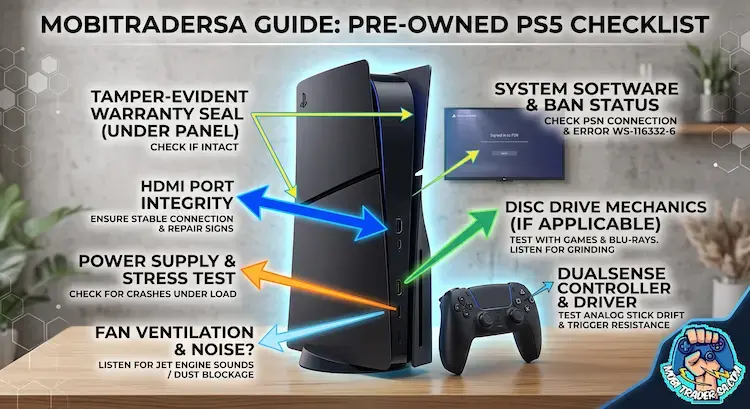
The exterior of a PS5 can tell you a lot about how the console was looked after. Before plugging it in and turning it on, check the following:
Scratches - Look for scratches on the side covers and around the USB port. A few light marks are normal, but excessive scratches should make you cautious.
Dust and Dirt - Some dust is normal, but it shouldn't have built up. If it's quite a lot, expect to pay for a service as the fan and heatsink is likely clogged.
Inspect All the Ports - Use the flashlight on your smartphone to inspect the ports, including USB ports, HDMI, and lan. You'll notice if any are damaged.
Warranty Sticker - You'll need to remove the side covers to see if the original stickers are still in place. If you can see the screws, ask the seller why the PS5 was opened.
Sound Test - From the moment you turn on the PS5, listen for any squeaks, loud fan noise, or strange disc sounds.
All our PlayStation 5 consoles are fully serviced and tested, ensuring the highest quality. Fans are cleaned, consoles are inspected, and we ensure it runs without any issues.
Software Checks
If the seller reset the PlayStation 5 before you arrived, tell them the tests will take a bit longer as you'll need to log into your PSN account.
Here's what you need to check on the PS5:
PSN Ban - If signed out, sign into your own PSN account and ensure no error codes come up when you try to sign in or access the PSN store. If you see WS-116332-6, walk away, the PS5 is useless and banned from PSN. You cannot fix this.
Error History - Navigate to Settings > Error History and use the history as a guidance for things you have to double-check.
Game Download - Download a free PS5 game from the PSN store (Astro's Playroom is free). Ensure the download speed is consistent and doesn't stop and start.
Disc Install - If it's a PS5 disc version, insert a clean PS4 or PS5 disc and listen for any strange noises. It should sound like a smooth spinning fan while installing the game. Pay attention for unrecognisable disc errors.
15 Minute Gaming Test - Once the game installs, open it and play for 10 to 15 minutes. Failing SSD, GPU, ram, liquid metal, or power supply issues will cause glitches, crashes, or the PS5 will turn off at complete random.
Our customers choose to pay a bit more and a fully tested and certified PS5 with a warranty. Based on the repair costs and risks, it's not worth taking the chance to save.
Controller Test
Downloading the Astro's Playroom game is a brilliant way to test the PS5 controller. As get Astro to run around, you'll experience the incredible haptic feedback as you can feel every step he takes.
You can also use the game to see if Astro moves by himself, turns, or if any buttons don't work.
We also recommend connecting the PS5 controller to your smartphone after testing the PS5. Here's how:
Turn off the PS5 and unplug it so the controller cannot connect.
Then, press and hold the share button and PS button until the controller flashes fast.
Look under Bluetooth devices on your smartphone and find the Dual Sense controller and connect.
Google a free PS5 controller tester or download an app.
Test all the buttons and ensure the analogs stay center when not touched. Also, ensure they reach all the corners when you move the joysticks.
Testing a PS5 FAQs
Is it safe to buy a used PS5 without testing?
No, you have to test the PlayStation 5 to ensure it's working properly and isn't banned from the PSN. Some faults are non-repairable, meaning you're buying parts at best.
What do I need to test when buying a pre-owned PS5?
You need to check the hardware, software, and test the accessories. The total tests usually take around 30 to 60 minutes. During these tests, it's important to follow all the steps and check everything on the PS5.
How do I avoid buying a broken PS5?
Choose a pre-owned PS5 from a trusted seller such as MobiTraderSA. We ensure the console is in perfect working order and give you a 6-month warranty that further protects your purchase.
How do I avoid scammers when buying a used PS5?
Platforms like MobiTraderSA and GamingConsoles.co.za were specially created to help South Africans buy and sell gaming consoles without having to deal with scammers. We courier anywhere in South Africa and are 100% legit with over 150 5-star ratings.


Comments